
Background
Over the past few months I have been doing lots of tinkering. Some in my Proxmox homelab, some in GNS3, Azure, PowerShell etc. I realized I really wasn’t documenting much of it. I had a few different Obsidian files with notes, but that was about it.
I wanted a better place to write about my experiences and an easier place for others to see what I am up to. So here we are!
What I’m using
Hugo - Some brief research on site generation had me settle on Hugo. I wanted to have more fine-grained control over the site than I would using something like Wix, but I also didn’t want to spend too much time on the design. I found a tempalte I like, this one here, and made a few layout/desisgn changes. This will surely change more over time, but I just wanted to get something up and running.
GitHub - The obvious choise for version control. And it integates super easily with Azure Static Web Apps.
Azure Static Web Apps - Azure has been my primary obession as of late. I knew I wanted to host my app here from the start. My goal is to do everything for as low cost as possible and using Infrastructure as Code to tear everything down and build it back up when I need it. The free tier of this service provides 100GB of bandwidth per month, which should be more than sufficient.
The Process
Setting this site up was very simple.
First I cloned the theme repo
|
|
I spent some time here figuring out where everything lived, and brushing up on CSS, HTML, and writing in Markdown
I removed a few things, made a few font changes. For example:
|
|
Pushed everything to GitHub with the classic
|
|
Next I made a quick budget in my Azure subscription. This is more so for future work, as the Static Web App service will just no longer serve my site if I go over my alloted 100GB per month. Unlikely to happen unless I go mega viral….
I created the Azure Static Web App via the GUI, and under Deployment details selected GitHub and connected my GitHub account. They make this so easy. You just select your repo and branch.
The Static Web App resource deployed and I watched my GitHub action complete.
The last thing I needed to do was add my custom domain name instead of the auto-generated one Azure provides.
All that is needed is to open the Custom Domains setting > Add “Custom domain on other DNS” > and enter your domain name.
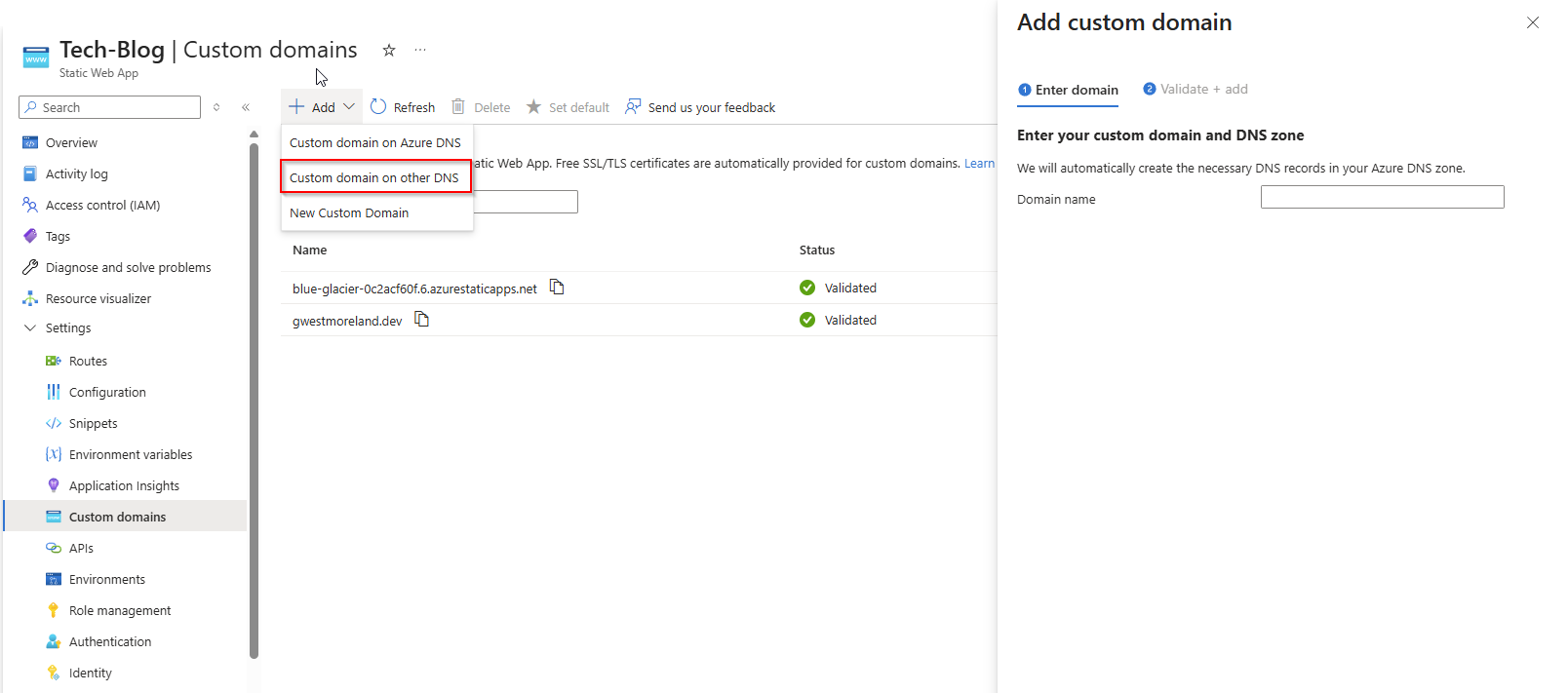
I added a TXT record in Cloudflare for validation, and a few CNAMES to make sure the generic Azure URL still resolves to my site.
Waited for everything to propogate and here we are!
This site is likely to always be a work in progress, and I’m super exicted just thinking about the posibilites.
Until next time.